
Grab hot deals you won’t find in-game!
Store-exclusive gifts!
-
-
-
-
-
-
-
-
Exclusive
-
-
-
-
-
-
-
-
Monthly
-
-
-
-
-
-
-
-
FAQ
About the Official Store
This store, powered by Xsolla Web Shop, is an official Shin Megami Tensei Liberation Dx2 retailer.
Please see Xsolla’s support site for more information on products purchased at this official web store.
Accepted Payment Methods
The following payment methods are currently accepted.
Japan: Credit cards, Apple Pay, Google Pay, PayPal
Internationally: Credit cards, Apple Pay, Google Pay, PayPal, Xsolla Pay.
How to Purchase
1. From the “Login” button at the top right of the official store, enter your Account ID for Shin Megami Tensei Liberation Dx2.
2. After you successfully log in, your Account ID will be displayed. Press OK after confirming that this is your account.
3. After you successfully log in, your Account ID will be shown at the top of the screen.
4. Select the product you wish to purchase.
5. Choose your preferred payment method.
6. Confirm that you are logged in with the correct Account ID, enter the required information for your chosen payment method, and complete the purchase.
7. When you log in to the game, the purchased items will be added to your account.
- Paid Gems are credited immediately and added to your total.
- Free Gems and items are sent to your Gift Box.
- If your purchase does not appear, please switch screens to refresh.
How to Confirm Your Account ID
(Steps)
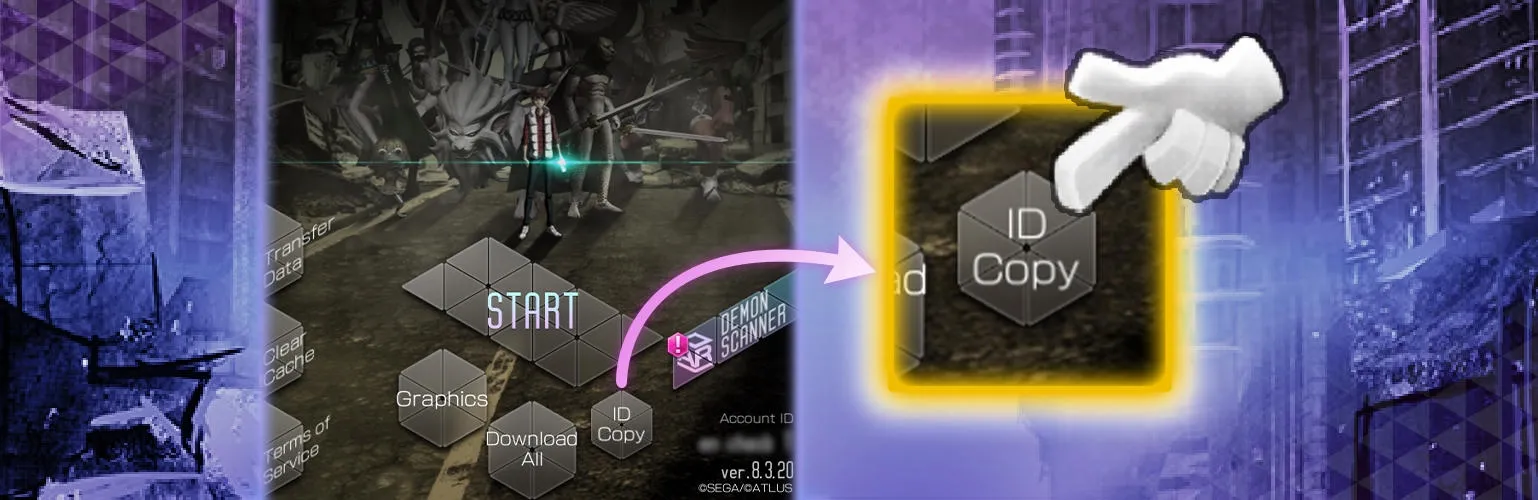
1. Launch Shin Megami Tensei Liberation Dx2. The game start screen will display.
2. Check the Account ID shown at the bottom right of the game start screen.
3. Press the “Copy ID” button.
*The Account ID is a 12-digit alphanumeric code.
*The 10-character alphanumeric code shown in the transfer settings is not your Account ID. Do not enter this number.
Inquiries
▼Payment-related Inquiries
▼Game-related Inquiries
https://segacustomer.zendesk.com/hc/en-us/categories/6856359717273
Log in to make purchases
Cart
Total
Additional taxes and fees may apply
Send game activation key to:We will send your receipt, game key, and instructions on how to activate it. For security and legal reasons, we may share your email with the game developer.
Cart
Your cart is empty. Go to the store and find something awesome to buy.